Stuck in a GBP Appeal Loop? Here's How to Escape
Three appeals in, every one refused, and the rejection email says the same nothing each time. “Not Approved.” No reason, no detail, no clue what to change.
Here is the part that matters: the loop is almost never a judgement about your business. It is a data mismatch that has not been found yet, and every resubmission that does not fix that mismatch produces exactly the same result. Faster, if anything.
Across 300 supervised reinstatements since early 2025, 295 profiles came back. About three quarters of those cases arrived after the owner had already lost at least one appeal on their own. So if you are reading this mid-loop, you are in the most common position there is.
The loop has a shape
You are in it when the rejections stop being informative:
- Multiple appeals refused with the same generic policy wording, none of it naming your actual situation
- Denials arriving within minutes, which tells you no human opened anything
- The obvious things already fixed, address formatting and so on, and still refused

Speed is the giveaway. A refusal that lands in minutes was an automated check against a data pattern, and it will keep landing in minutes until the pattern changes.
Why appeals actually bounce
In our own case data the causes cluster tightly. Roughly 55% of suspensions trace back to excessive editing, too many saves to the profile in one session, usually across the name, address, phone, URL and category fields. Another 35% come from an edit to one of those fields where the new value does not match the official documents or the website. The remaining 10% are forced re-verification, account-level flags and genuine spam detection.
Read that split again, because it explains the loop. In the large majority of cases the trigger is a mismatch between your profile and your paperwork. Appealing does not fix a mismatch. It just asks the same system to look at it again.
The invisible field problem
The mismatch is often somewhere you are not looking. An overreaching list of service areas, a leftover keyword in the business description, a suite number on the licence that is absent from the profile. The owner fixes the business name, appeals, gets refused, and concludes the system is broken. The system is working exactly as designed on a field they have not checked.
Account-level flags
If the Google account managing the profile has managed other suspended listings, refusals can attach to the account rather than the listing. Nothing you change on the profile will move it, which is a genuinely maddening version of the loop.
The 60 minute rule almost nobody knows
This is the single most useful thing in this article.
When you submit an appeal, Google may offer a linked form to attach supporting evidence. Google’s own documentation states: “Once you open the evidence form, you must submit it within 60 minutes or it won’t be attached to your appeal.” (Google Business Profile Help)
Open that form before your documents are ready and the clock is already running. Miss it, and your appeal is assessed with no evidence attached. It still gets refused, and the refusal looks identical to every other refusal, so you learn nothing from it.
Have every file named, scanned and on your desktop before you open the form. Not during.
The evidence Google actually names
There is a lot of confident, wrong advice about this. Google publishes the list, so use the list:
| Google explicitly names | Notes |
|---|---|
| Official business registration | Strongest single document |
| Business licence | Must carry the same name and address as the profile |
| Tax certificates | Useful where a licence does not apply |
| Utility bills: electricity, phone, water, internet | Phone and internet bills are named by Google, contrary to a lot of published advice |
Google’s stated requirement is simple: “check that the business name and address match the profile you want to make an appeal for.” Character for character, not close enough.
Storefront photographs showing permanent signage carry real weight too, and for service area businesses, permanently branded vehicles do the same job.
The second appeal is real and most people miss it
A refused appeal is not the end of the road, and this is the step most owners never find.
Google’s documentation is explicit: “Only if your reinstatement request is denied, we may be able to do an additional review to prove your eligibility. You can submit an additional review to a denied request. You can provide additional evidence that wasn’t added with your original appeal.” (Google Business Profile Help)
So there is a formal second bite. It only exists after a denial, and its entire value is the new evidence you attach. Submitting the same appeal again is not an additional review, it is just another rejection.
Google issues a case ID when a request is handled. Keep it. If a case ever needs escalating past the second review, that ID is the thing that lets anyone pick the case up where it stopped.
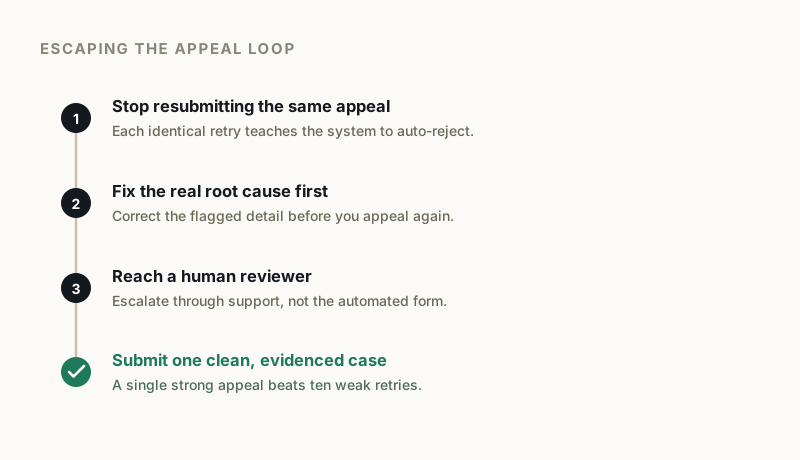
How we break a loop
Our process is deliberately slow at the front and fast at the end, because the front is where loops are actually broken.
We audit the profile against the documents first and find the mismatch. Then we tell you exactly which documents to prepare and precisely what to change on the site and the profile before anything is submitted. When it is all ready, we get on a call, usually about 15 minutes, and walk you through submitting it from your own account with everything already prepared.
Clean cases, where documentation is right first time, typically come back within 24 to 72 hours. Cases needing escalation run longer, from around 48 hours to a couple of weeks. If a first and second appeal have both been refused, an escalation case is the next stage, and there you do nothing except hand over the case ID Google issued on the failed second appeal.
Five of those 300 cases did not come back. That is not a rounding error we are hiding, it is the honest shape of the work: some profiles are not recoverable, and the useful thing is to say so before anyone pays.
What makes the loop worse
- Resubmitting daily. Repeated identical submissions look like spam behaviour and make the eventual real appeal harder.
- Appealing before fixing. The most common failure mode there is. Fix the mismatch, then appeal, never the reverse.
- Opening the evidence form early. See the 60 minute rule above.
- Creating a second profile for the same business. Google’s guidance is direct on this: “Do not create a new Business Profile for the same business while your appeal is under review.” (Google Business Profile Help) It creates a duplicate problem on top of a suspension problem.
That last one is worth dwelling on, because starting fresh gets recommended a lot. It costs you every review and all your ranking history, and while an appeal is live it actively works against you.
When it is time to hand it over
Some honest signals: two well-prepared appeals have already failed, the refusals point at something account-level rather than listing-level, or the profile has been down long enough that lost revenue dwarfs the cost of fixing it.
The loop is breakable. It is almost always one mismatch, one missing document, or one evidence form that timed out. Find that, and the same system that refused you three times approves you without comment.
If you want the mismatch found for you, start with a free audit and we will tell you what is keeping you stuck, including if we think the profile cannot be recovered.
GBP Reinstatement Experts
Our team works exclusively on Google Business Profile suspensions, recovering suspended profiles for businesses of every size.
About our GBP reinstatement team arrow_forward