Why Your GBP Appeal Was Denied and What to Do Next
A denial email that says “Not Approved” and nothing else is not Google being cryptic for the sake of it. That status is one of a small fixed set the appeals tool can return, and the reason behind it is usually mechanical rather than editorial.
Which is good news, because mechanical problems have mechanical fixes.
The denial is usually about your paperwork, not your business
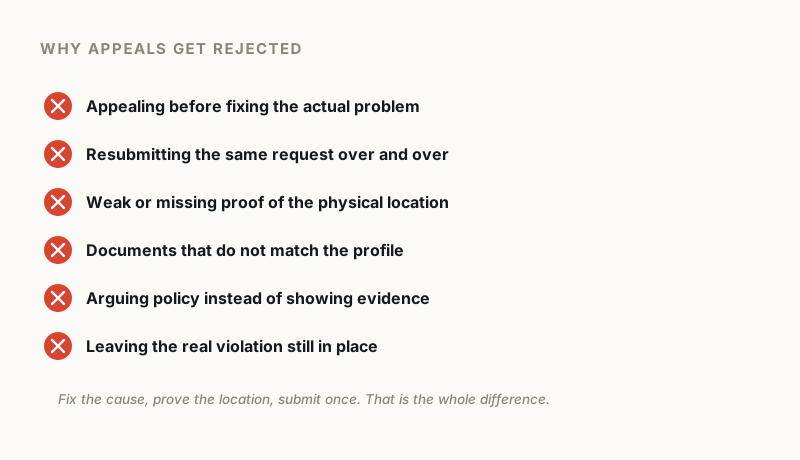
Start with the uncomfortable one. The most common reason an appeal fails is that it was submitted before the underlying violation was fixed. Google’s own community guidance puts it plainly: “Address potential violations first, then gather strong evidence. Submitting without fixes often leads to denial.”
An appeal is not an argument. It is a request to re-check a profile against the rules. If the thing that broke the rules is still there, re-checking finds it again.
In our own case data the triggers cluster narrowly. Around 55% of suspensions trace to excessive editing, too many saves in one session across the name, address, phone, URL and category fields. Another 35% come from an edit to one of those fields where the new value does not match the official documents or the website. The last 10% are forced re-verification, account-level flags and genuine spam detection.
Nearly all of that is a mismatch between what the profile says and what your paperwork says.
The half-finished rename
The classic version: a business name once read “Best Plumber in Dallas”, the owner strips the keywords from the profile, appeals, and gets refused.
The keywords are still in the website footer. Still on the invoice template. Still on the van. Google is comparing the profile against everything it can see about the business, so a rename that only happens in one place reads as an inconsistency rather than a fix.
The evidence form has a 60 minute timer
This one causes a lot of denials that look mysterious from the outside, and it is documented.
After you submit an appeal, Google may offer a linked form for supporting evidence. Their documentation states: “Once you open the evidence form, you must submit it within 60 minutes or it won’t be attached to your appeal.” (Google Business Profile Help)
Open it while you go hunting for a utility bill and the window can close around you. The appeal is then assessed with nothing attached, refused as an unsupported claim, and the refusal reads identically to every other refusal. Nothing tells you the evidence never arrived.
Have every file scanned, named and sitting on your desktop before you open the form.
What Google actually accepts
Google names the categories directly, so there is no need to guess:
- Official business registration
- A business licence
- Tax certificates
- Utility bills for the business: electricity, phone, water, internet
Worth flagging, because a lot of published advice gets this wrong: phone and internet bills are on Google’s own list. Plenty of articles tell people not to bother submitting them.
The stated requirement for all of it is that “the business name and address match the profile you want to make an appeal for.” Character for character. A suite number on the licence that is missing from the profile is enough to fail the check.
For a storefront, photographs of permanent signage do heavy lifting. For a service area business, permanently branded vehicles do the same.
Appeal language that works
Defensive appeals fail. So do vague ones.
What works is short, specific and unglamorous: name the violation, name the fix. “Our business name contained marketing keywords. We have removed them from the profile, our website footer and our invoice templates, and the name now matches our state registration exactly.”
That gives a reviewer something to verify. “We did nothing wrong” gives them nothing.
After a denial there is a second door
Most owners never find this, and it matters more than anything else in this article.
A refused appeal is not the end. Google documents an additional review: “Only if your reinstatement request is denied, we may be able to do an additional review to prove your eligibility. You can submit an additional review to a denied request. You can provide additional evidence that wasn’t added with your original appeal.” (Google Business Profile Help)
Note what the value hinges on. Additional evidence. An identical resubmission is not an additional review, it is another rejection with extra steps.
Google issues a case ID when a request is handled. Keep it somewhere safe. If the case ever needs to go past the second review, that ID is what lets anyone pick it up from where it stopped.

Do not start a second profile
It gets suggested constantly and it is a trap. Google’s instruction is direct: “Do not create a new Business Profile for the same business while your appeal is under review.” (Google Business Profile Help)
You end up with a duplicate-listing problem stacked on top of a suspension problem, and you forfeit your reviews and ranking history to get it.
How we approach a denied case
About three quarters of the businesses that come to us have already lost at least one appeal on their own. That shapes the process.
We audit the profile against the documents first and find the actual mismatch, which is frequently not the thing the owner assumed. Then we tell you exactly which documents to prepare and what to change on the site and the profile before anything is submitted. When it is ready, we get on a call, usually about 15 minutes, and walk you through submitting from your own account with everything prepared in advance.
Where documentation is right first time, cases typically resolve in 24 to 72 hours. Cases needing escalation run from around 48 hours to a couple of weeks. If both appeals have already been refused, escalation is the next stage, and at that point you do nothing except hand over the case ID from the failed second appeal.
We have supervised 300 reinstatements since early 2025 and 295 came back. The five that did not were genuinely unrecoverable, and the useful thing in those cases was establishing it before anyone paid rather than after.
Before you appeal again
Slow down enough to do these properly:
- Check the profile name against your registration, your website footer and your signage, and make all four agree
- Scan your licence and a recent utility bill as clean, legible PDFs
- Photograph permanent signage, or the branded vehicle if you are a service area business
- Write the two sentences naming the violation and the fix
- Only then open the appeals tool, with the files already on your desktop
If a second appeal has already failed, stop submitting. At that point more attempts do not improve the odds, and a free audit will tell you whether the case is escalation material or genuinely unrecoverable.
GBP Reinstatement Experts
Our team works exclusively on Google Business Profile suspensions, recovering suspended profiles for businesses of every size.
About our GBP reinstatement team arrow_forward