How to Safely Edit Your Google Business Profile Without Getting Suspended

Most people assume suspensions happen to businesses that did something wrong. In our casework the more common story is a business that did something ordinary, in the wrong order.
Around 55% of the suspensions we handle trace back to excessive editing, meaning too many saves in one session across the name, address, phone, URL and category fields. Another 35% follow an edit where the new value did not match the official documents or the website.
Editing is not a minor administrative act. It is the single most dangerous thing you routinely do to your profile.
The fields that carry the risk
Not all edits are equal. These five are the ones Google cross-checks hardest:
- Business name. Highest risk of all.
- Address. High, and frequently triggers re-verification.
- Primary category. High, because it defines what the business is.
- Phone number and website URL. Moderate, but they are cross-checked against your site and directories.
- Service area. Moderate, and a common trigger for service area businesses.
Photos, posts, attributes, hours and Q&A replies sit in a different tier. You can maintain those freely.

Why an innocent edit looks suspicious
Google’s concern is businesses being quietly transformed into something else, which is how listing hijacking and lead-generation spam work in practice.
The policy overview says so directly: edits that “attempt to significantly change the nature of a business are often fraudulent or indicate that the business listing should be removed”, and that significant changes to name or category may simply be rejected. Where a genuinely different business now occupies an address, Google’s instruction is to mark the previous one permanently closed rather than rename it. (Overview of Google Business Profile policies)
Nothing in that logic can tell the difference between a rebrand and a hijack from the inside. It sees several core fields changing at once and treats the pattern as the signal.
The sequence that works
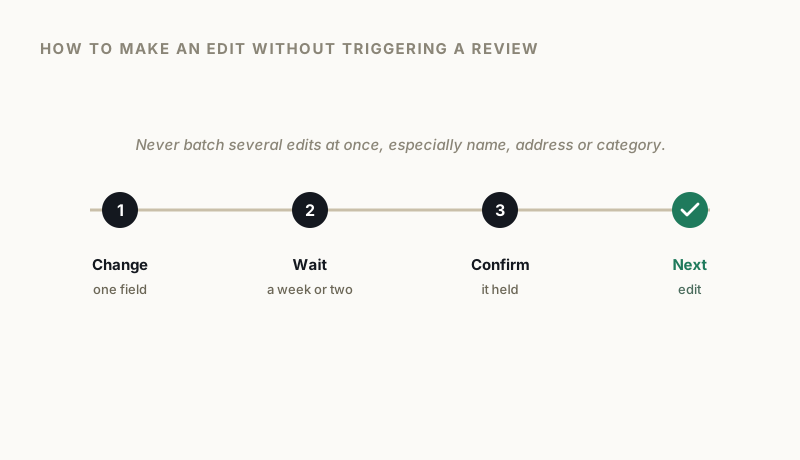
One field at a time. If the address and the name both need to change, do the address, wait, confirm it has held, then do the name. Changing both in one sitting is the pattern that gets flagged.
Wait between changes. Give an edit time to settle and verify it is live on Maps before you touch anything else. Days, not minutes.
Fix the outside world first. Before you change the profile, update the website footer, the invoice template and the major directories. Google measures the profile against everything else it can see, so if the profile changes first it is briefly the only source saying something different. That gap is what reads as inconsistency.
Have the evidence before you start. Registration or licence showing the new detail, a recent utility bill for a new address, photographs of signage. Scanned, named, on the desktop. If the edit triggers re-verification, you are ready in minutes rather than scrambling.
Change by change
Business name. Only change it if the real-world name genuinely changed. Google requires the profile name to match the name “as used consistently on your storefront, website, stationery, and as known to customers”, and warns that unnecessary additions to it can result in suspension. (Guidelines for representing your business on Google)
If you are trading under a new name, register it properly first. The registration should predate the profile edit, not follow it.
Address. Expect re-verification, often by video, and prepare for it before you submit the change. If you are moving premises, move the paperwork first: the lease, the utility account, the signage. An address Google cannot confirm gets the profile disabled outright.
Primary category. Changing it redefines the business. Secondary categories are far less sensitive, so if you are broadening services, add a secondary rather than rewriting the primary.
Service area. Expand gradually. A sudden jump from a city to several states is a classic spam signal, and for service area businesses it is one of the more common suspension routes.
If an edit triggers verification
Do not panic and do not edit anything else. Adding more changes on top of a pending verification is how a recoverable situation becomes a suspension.
Complete the verification with the evidence you already prepared. If it is video, film continuously, show the exterior and signage, show the interior, show equipment or branded vehicles, and demonstrate management access, unlocking the door or accessing the till area.
What we do not recommend
Some widely repeated editing advice has no support behind it, and we would rather say so than repeat it. There is no evidence that editing during particular hours of the day, or on particular days of the week, changes your risk. The same goes for elaborate rituals about devices and networks.
What actually matters is boring: one change at a time, evidence ready, everything else already consistent.
Keep a record
Note what you changed and when. A short log, date, field, old value, new value, reason.
If a suspension follows two weeks later, that log turns “we are not sure what happened” into “we changed the primary category on the 14th”, which is the difference between a diagnosis and a guess. It is also the fastest way for anyone helping you to find the trigger.
Of the 300 cases we have supervised since early 2025, the ones that resolved fastest were nearly always the ones where the owner could say exactly what they had changed, and when.
If you have an edit coming up that worries you, or one has already gone wrong, a free audit will tell you where the profile is exposed.
GBP Reinstatement Experts
Our team works exclusively on Google Business Profile suspensions, recovering suspended profiles for businesses of every size.
About our GBP reinstatement team arrow_forward