Why Your Google Business Profile Was Suspended: Top 10 Causes
Most suspensions are not a judgement about whether your business is real. They are a mismatch between what your profile says and what Google can verify elsewhere.
In our own case data the triggers cluster tightly. Around 55% trace back to excessive editing, too many saves in one session across the name, address, phone, URL and category fields. A further 35% follow an edit to one of those fields where the new value did not match the official documents or the website. Everything else, roughly a tenth, is forced re-verification, account-level flags or genuine spam detection.
Before fixing anything, work out which type you have. Google’s guidance separates them cleanly: a soft suspension leaves the profile live on Search and Maps but locks editing until an appeal clears, while a hard suspension removes the profile from Search and Maps entirely. Search your exact business name in an incognito window. Still visible means soft, gone means hard.
Here are the causes worth knowing, and what each one actually requires.
1. Business Name Violations
The most common single trigger, and the one Google is most explicit about. The guidelines require a name that reflects “your business’s real-world name, as used consistently on your storefront, website, stationery, and as known to customers”, and state that “including unnecessary information in your business name isn’t permitted, and could result in the suspension of your Business Profile.” (Guidelines for representing your business on Google)
The name field is for the name. Everything owners are tempted to add belongs elsewhere:
- Keyword Stuffing: Adding search terms (e.g., “Best Plumber Dallas”).
- Location Modifiers: Adding the city name when it’s not part of the legal entity (e.g., “Joe’s Pizza NYC”).
- Taglines: Including slogans (e.g., “ABC Services - We Care”).
- Credential Stacking: Adding degrees or certifications (e.g., “Dr. Smith MD PhD”).
- Service Descriptions: Adding hours or availability (e.g., “24/7 Emergency”).
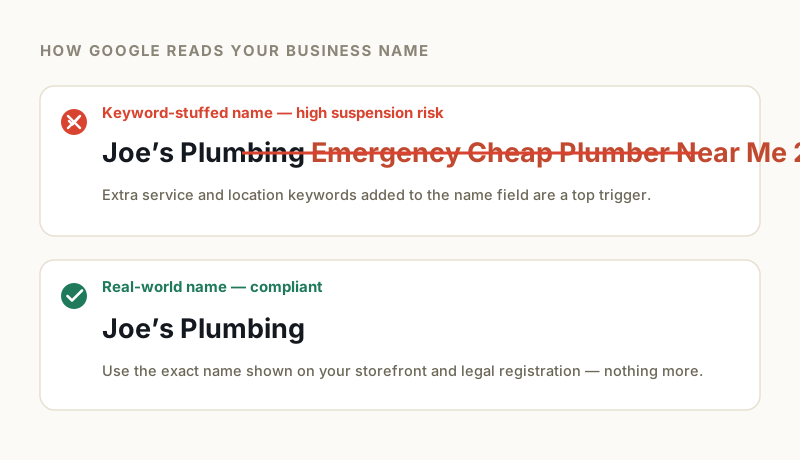
How to fix: Check your Secretary of State filing or business license. Edit your Google Business Profile name to match that legal document character-for-character, removing any extra words.
2. Address Problems
Google’s policy overview is unusually direct here: “Businesses with a P.O. Box address aren’t permitted on Google Business Profile. Merchants that set their business address at a P.O. Box will have their profile suspended.” It is equally clear about premises: “If we determine that your business doesn’t exist in the location you claim, Google will disable your profile.” (Overview of Google Business Profile policies)
Mailbox services that look like street addresses are the usual trap. Common triggers:
- Virtual Offices: These are strictly prohibited unless you have your own dedicated office and staff present during listed hours.
- Co-working Spaces: You must have a dedicated office with permanent signage to be eligible; a “hot desk” membership is not enough.
- Residential Addresses: Service-area businesses can use home addresses, but they must hide the address from the public view.
- P.O. Boxes: These are never permitted, including UPS Store locations.
- False Addresses: Listing a location where you do not physically operate.

How to fix: Ensure your address is a legitimate place of business where customers can meet you face-to-face. If you are in a co-working space, upload a video showing your permanent signage on your specific office door.
3. Category Misuse
Google’s instruction is to “choose the fewest number of categories it takes to describe your overall core business.” Selecting every adjacent category to widen reach works directly against that.
Category stuffing means picking everything related rather than what you actually do. Common mistakes:
- Irrelevant Services: A plumber listing themselves as a “General Contractor” to cast a wider net.
- Conflict of Interest: Selecting categories that imply different business models (e.g., a restaurant also listing as a “delivery service” incorrectly).
- Manipulation: Changing categories frequently to chase seasonal trends.
How to fix: Audit your primary category to ensure it is your main source of revenue. Select only 2-3 secondary categories that are directly relevant to your specific offering.
4. Duplicate Listings
Having multiple listings for the same business confuses Google’s algorithm and often leads to the suspension of both profiles.
Duplicates are usually accidental, created when an owner loses access to an old account and starts again rather than recovering it.
- Same Location: Two profiles for the same business at the same address.
- Practitioner vs. Practice: In legal and medical fields, creating a profile for the doctor and the clinic is allowed, but they must be managed carefully to avoid looking like duplicates.
- Slight Variations: Creating a second listing for “Department B” or a specific service at the same address.
How to fix: Use the Google Maps “Suggest an edit” feature to report the duplicate if you don’t own it. If you have access to both, merge them by contacting Google support or removing the unverified one.
5. Verification Failures
Video verification is now routinely requested, particularly for service area businesses and higher-risk categories, and a failed or incomplete verification is a common route into suspension.
Problems during verification include:
- Failed Video Uploads: A common bug where the video uploads but doesn’t process.
- Incomplete Evidence: The video fails to show the three required elements: Location, Equipment, and Management.
- Verification Fraud: Attempting to verify a location using a spoofed GPS signal.
- Code Entry Errors: Entering the postcard code incorrectly multiple times.
How to fix: When recording your verification video, include a continuous, unedited shot that proves you have management access, such as unlocking the business door with a key. Google names proof of management as one of the three things the video must show, and it is the element most recordings underplay.
6. Service Area Business Issues
For businesses that travel to customers, such as plumbers or landscapers, the rules are strict.
Overreaching service areas are the most common tripwire here.
- Overreaching service areas: Google states you must specify service areas by city or postal code rather than a radius, allows up to 20 of them, and expects the overall boundary to stay within about 2 hours of driving time from your base.
- Too Many Areas: You are limited to 20 specific service areas (cities or zip codes).
- Visible Home Address: If you serve customers at their location, you must clear your address field in the dashboard.
How to fix: Review your service area list. Delete any cities or zip codes that are more than a two-hour drive from your home base or office.
7. Review Manipulation
Activities that trigger review-related suspensions are now subject to federal scrutiny.
The FTC’s “Rule on the Use of Consumer Reviews and Testimonials” allows for civil penalties of up to $53,088 per violation for knowing violations, a figure the FTC raised from $51,744 on 17 January 2025 and confirmed again in warning letters issued in December 2025. Google has tightened its filter accordingly.
- Review Gating: Asking only happy customers for reviews while filtering out unhappy ones.
- Incentivized Reviews: Offering discounts, cash, or free gifts in exchange for a review.
- Review Exchanges: Swapping reviews with other business owners.
- Competitor Attacks: Posting negative reviews on a competitor’s profile.
How to fix: Let reviews happen organically. Never offer compensation for feedback, and ensure you ask all customers for a review, not just the satisfied ones.
8. Ownership and Access Issues
Problems with who manages the profile can trigger a security suspension.
We frequently see this happen when a business fires a marketing agency that still has “Primary Owner” access.
- Conflicting Changes: Multiple managers making different edits simultaneously.
- Rogue Agencies: A former marketing company holding the profile hostage or making malicious edits.
- Hijacked Profiles: Unauthorized users gaining access through phishing.
- Disputed Ownership: Multiple claims on the same profile verified by different people.
How to fix: Audit your “Users” tab today. Ensure you are the “Primary Owner” and remove any email addresses that no longer need access.
9. Quality Issues
General quality flags are often a catch-all for “suspicious activity.”
Google’s algorithms monitor for patterns that look like spam.
- Inconsistent NAP: Your Name, Address, and Phone number on your website do not match your Google Profile.
- Stock Photos: Uploading generic stock images instead of real photos of your team and work.
- Spammy Posts: Posting content that looks like low-quality keyword stuffing.
- Rapid Edits: Making dozens of changes to your profile in a single hour.
How to fix: Maintain a “Documentation Folder” with your utility bill and business license. Ensure your website footer matches your Google Profile exactly, down to the suite number formatting.
10. Industry-Specific Violations
Certain industries face extra scrutiny due to high rates of spam and fraud.
- Locksmiths & Garage Door Repair: These categories are under constant manual review; advanced verification is almost always required.
- Healthcare: Profiles must adhere to strict naming conventions and cannot use marketing language.
- Financial Services: Listings are often cross-referenced with regulatory databases.
- Legal Services: Bar association rules regarding advertising often overlap with Google’s policies.
How to fix: If you are in a high-risk category, do not make edits to your profile without having your business license and insurance documents ready to upload immediately.
How to Determine Your Suspension Cause
Google rarely states the exact reason for a suspension in their email notifications. To identify the cause, you need to investigate.
- Check the Status: Log into your dashboard. A “Disabled” status usually means a complete removal (Hard Suspension), while “Suspended” often means it requires re-verification (Soft Suspension).
- Review the “Info” Tab: Look for orange strike-throughs on your data; these are edits Google has rejected.
- Audit Recent Changes: specific edits made 24-48 hours before the suspension are the likely culprits.
- Check Your Industry: High-risk categories like locksmiths should expect periodic re-verification triggers.
- Use the Tool: Google’s “Account Troubleshooter” tool can sometimes provide a generic reason for the action.
Prevention Strategies
To avoid future suspensions, you must treat your profile as a compliance document, not just a marketing channel.
- Know the Guidelines: Read Google’s official “Guidelines for representing your business on Google” annually.
- Make Careful Changes: Avoid editing your name, address, or phone number unless absolutely necessary, as this triggers re-verification.
- Monitor Your Profile: Check your profile weekly for unauthorized “suggested edits” from users or competitors.
- Keep Documentation: Always have a utility bill dated within the last 90 days available.
- Stay Conservative: If a tactic feels like a “hack” to get better rankings, it will likely lead to a suspension.
Understanding these triggers is your best defense. A clean, compliant profile is far more valuable than a risky one that disappears overnight. If you’re unsure what triggered your suspension, our free audit can help identify the specific cause.
GBP Reinstatement Experts
Our team works exclusively on Google Business Profile suspensions, recovering suspended profiles for businesses of every size.
About our GBP reinstatement team arrow_forward